
Google is proactively auditing websites to ensure they are fully compliant with Consent Mode v2 – issuing scary looking emails if they deem your website is out of compliance. Installing an approved CMP (consent management solution) is only the first step – most simply don’t work out of the box.
Google Ads customers are now seeing “[Action required] Compliance with Google’s EU user consent policy” drop into their inbox.
In this guide, I‘ll walk you through the problems I encountered and my solution – including an overview of core principles, tag sequencing and the use of strict mode setup that eliminates modelled data. What This Article Covers:
- The race condition I discovered
- Why the race condition affects every page
- Exploring a dual-container setup
- My CMP solution – core principles & concepts
- Understanding Basic vs Advanced Consent Mode
- Core principles in my gating script
- Two core concepts behind my GTM setup
- Core GTM / Tag principles (Using gtag as the example)
- Validation – auditing Consent Mode compliance
- Consent Mode codes in the Dev Console
- Tag Assistant’s consent tab
- Choosing a Google aproved CMP
- Why I chose CookieYes
- Key CookieYes settings
- Note on IAB TCF v2.2
As a bonus, I‘ll share my custom gating script for GTM that fixes common ‘race conditions’.
The race condition I discovered
With the CMP installed, I reviewed how consent was passed to Google tags. I was particularly interested in the status passed with page hits from previously consented users.
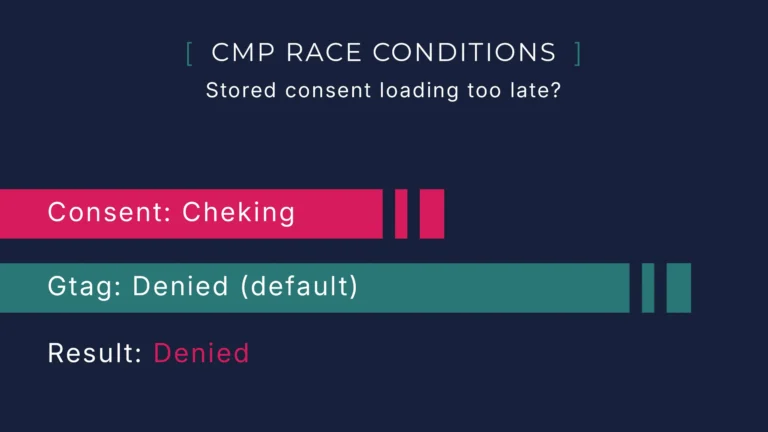
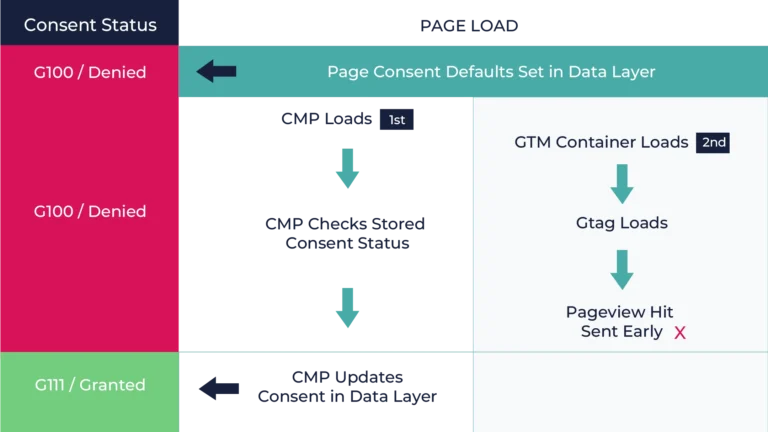
Everything looked fine at first glance, however, after checking network requests, the sequence was off. Shockingly I discovered a clear race condition:
- Page defaults should be set to
denied. - The CMP initiates first but still needs to check and update the user’s stored consent status.
- Tag Manager initiates second but can already fire the
gtagpageview before the CMP has fully synced the status. - As a result,
gtagfires with consent set todenied(the page default).
Ok what does this mean in practice? Even if a visitor grants consent on their first visit, every subsequent pageview could still fire GA4 hits using the wrong consent status (denied). At best, only reduced cookieless pings are sent, and modelled data makes the reports look complete – likely why this is often missed, modelled data is masking the problem.
“Surely I’m not the first to see this?”
I tried to sense check this but found no evidence to contradict my findings. It appears to be a real but under-discussed flaw in how CMPs and Google’s tags interact out of the box.
Why the race condition affects every page
You would think it’s only the first visit that suffers from this problem – once consent is given, all other pageviews will be sent with the correct status, right? Seems not.
Consent Mode v2 requires that all pages start with denied by default on load. It is then only the CMP that can update that state in real time, and for that, it must check the stored preferences.
Because consent denied is pushed by design on every load, if Google Tag Manager or gtag runs before the CMP updates the state, tags will fire with denied status and send cookieless pings – unless you’re running in strict mode.
In other words, without correct sequencing, every pageview risks sending junk data to GA4, not just the first.
Exploring a dual-container setup
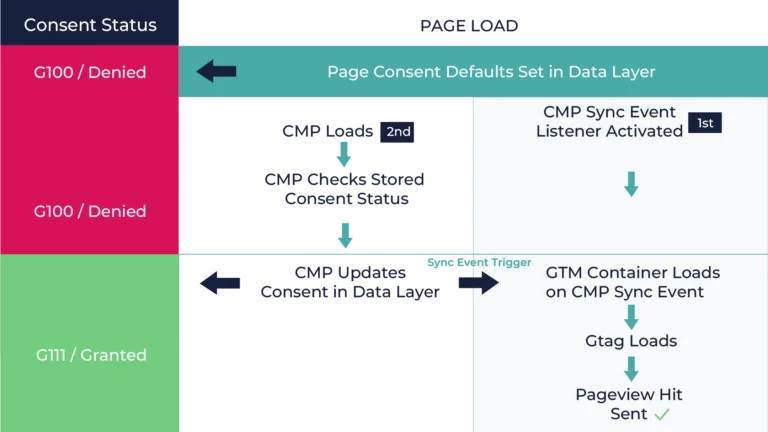
To tackle the race condition, the goal was clear: delay the firing of tags until the CMP had fully synced. I first considered a GTM-only solution – loading the CMP inside tag manager along with all required tags.
To keep things clean and avoid complexity, I tested using a dual-container setup. One to handle defaults, the CMP and non-consent-based tags; the other for strict gating:
- Container 1 – set defaults to
denied, loads CMP script, and only loads the second GTM container after the CMP update event. - Container 2 – held all consent-dependent tags, gated to fire only after the CMP pushed a
cookie_consent_updateevent into thedataLayer.
This worked well – the sequencing behaved as expected, and tags only fired once the true consent status was known.
The problem was with the optics – in Tag Assistant, the timeline appeared broken due to how events were logged versus actual execution time. At first glance, the GA4 page hits seemed to be sent before consent was known (which wasn’t possible of course).
For me, it was important that sequencing could be clearly demonstrated in Tag Assistant and not rely solely on the Dev Console for validation. I decided to take another approach: gate a single GTM container inside the <head> section of the site. The trade-off is that it requires some additional developer support.
My CMP solution - core principles & concepts
After deciding against the dual-container setup, I moved to a single, fully gated GTM implementation. The final solution keeps sequencing clean, ensures consent is always resolved before any tags load, and provides clearer optics for validation.
For better context, I’ll outline the core principles and concepts that underpin this approach. Together, these form the basis of a Consent Mode v2 CMP setup that’s compliant, auditable, and built to address common technical issues.
Understanding Basic vs Advanced Consent Mode
To clear up any confusion around ‘cookieless pings’ and modelled GA4 data, it’s worth clarifying the difference between Google’s two Consent Mode behaviours – Basic and Advanced.
Advanced Mode (the default) – Allows tags to fire immediately, even before the CMP has set the user’s preferences. In this mode, Google still fires the tags and only sends reduced ‘cookieless’ requests (not full GA4 hits) – anonymous signals that contain basic non-identifiable context such as page URL, device type, region, and timestamp.
These ‘cookieless’ requests can be used later for modelling, helping Google model traffic and conversion patterns based on data from consented users. If a user later consents, the modelling can try to match the patterns of previous signals to backfill the cookieless pings – but it’s not 100% accurate.
Basic Mode / Strict Mode – Blocks all Google tags until consent is known. No pings sent, no cookies stored, and no modelling data applied. The result is smaller but clean, fully consented data. This approach requires intentional gating logic.
In simple terms, Advanced Mode allows Google to fill in data gaps with modelling, while Basic Mode favours precision and compliance first.
When implemented correctly, Advanced Mode also complies with Google’s EU User Consent Policy, however, my implementation uses the Basic (strict) Mode throughout.
Core principles in my gating script
My final solution requires a small wrapper script that controls when GTM is allowed to load. I’ll include a download link below, but here’s a quick overview of the key principles:
- 1) Set defaults immediately
- To comply with Consent Mode v2, all defaults must be set to
deniedbefore anything else runs. The script pushes agtag('consent','default', …)call into thedataLayerat the very start. - 2) Intercept the CMP update
- I override
dataLayer.pushto watch for CookieYes’scookie_consent_updateevent. When it appears, I let the event push through first and then I boot GTM so Tag Assistant shows the consent update before GTM initialises. - 3) Failsafe timer
- If the CMP never fires, GTM will still boot after a short timeout (≈ 4000 ms). Ensure that all tags run in strict mode with explicit consent checks.
- 4) Load CMP last
- I load the CMP script only after the event listener is ready, so there’s no chance of CookieYes pushing its event before my script can catch it.
- 5) No
<noscript>iframe - I deliberately don’t use the GTM
<noscript>iframe in the body because it would bypass the gating logic.
Together, these steps ensure sequencing, proper gating, and a clear audit trail. Feel free to modify for your own use.
Two core concepts behind my GTM setup
Before diving into GTM, there are two key concepts that shaped how I approached tagging under Consent Mode v2.
Basic Mode: no cookieless pings, no modelling – this part is subjective, but I prefer clean, raw data over modelled data. If GA4 is full of cookieless pings, it becomes harder to apply my own modelling frameworks – you end up with modelling data that has already been modelled once.
By enforcing a strict consent check, cookieless pings aren’t sent, and every hit is genuine. The dataset is smaller, but it’s clean. From there, I can apply my own modelling or correlation. For similar reasons, I also disable Enhanced Measurement in GA4.
In Basic (strict) mode, page-load-based tags won’t automatically fire after consent is granted – when a new user lands on a website, there’s no consent yet. The initial gtag doesn’t load and send the GA4 pageview hit, and things like conversion linker do not fire to capture gclids (Google Ads) either. Note: in Advanced mode, GA4 may reprocess on-page pings once consent flips to granted.
A working Basic Mode setup should ensure essential tags attempt to fire again once consent is granted not just on page load.
Core GTM / Tag principles (Using gtag as the example)
Once GTM is gated properly, the next step is controlling how tags fire. Using the Google tag (gtag) as an example, the key principles are:
- 1) Enforce consent before firing
- GTM has built-in consent checks for tags using Google products. While these technically ensure compliance, they still allow cookieless pings – fine unless, like me, you prefer to avoid modelled data. To avoid this, I explicitly require
analytics_storageconsent before the tag can fire. - 2) Trigger on the consent update event
- Instead of firing on ‘All Pages,’ I use the CMP’s
cookie_consent_updateevent as a custom trigger. The key is that multiple consent updates are sent – one when the page loads and another when the user actually consents. We want both to attempt firing thegtag. - 3) Allow unlimited firing
- The first consent update from the CMP isn’t a user action – it’s just the stored status being synced after page load. The actual user consent would be the second event.
For new users, if the tag were limited to “once per page,” the first event would consume the trigger, and the real user’s first consent would never fire the tag – no pageview would be sent.
In practice, testing shows
gtagignores repeat initialisations, so duplicate pageviews aren’t an issue.
Applying the same principles to other tags:
- Conversion Linker should run on the same principles, but require
ad_storageconsent instead ofanalytics_storage. - Other GA4 events and Google Ads conversion tags can fire under normal trigger, but it’s still best to set explicit consent checks rather than relying on GTM’s built-in ones.
Validation - auditing Consent Mode compliance
After everything is set up, the final step is validation – confirming that everything is working in line with Consent Mode expectations. Tags should only fire once consent is known – or with defaults set to denied – and the correct consent signals are being sent to Google.
There are two main ways to check this: inspecting network requests in your browser’s developer console and using Tag Assistant’s built-in Consent tab for a quick visual overview.
Consent Mode codes in the Dev Console
The simplest way to audit Google Consent Mode is through your browser’s developer console. Filter network requests for ‘collect’ to isolate the specific Google GA4-related page hits, and look for requests containing something like: collect?v=2&tid=G-XXXXXXXXXX.
When you inspect one of these requests, you should see the parameters gcs and gcd in the payload. The presence of those parameters and their values is what matters – if they’re missing, it means no consent values are being set.
Here’s how to interpret the gcs parameter values returned in GA4 requests:
gcs=G100- No consent – both
ad_storageandanalytics_storagearedenied. gcs=G101- Analytics is
granted, ads isdenied. gcs=G110- Ads is
granted, analytics isdenied. gcs=G111- Both are
granted.
The gcd parameter carries extra consent data, including v2 fields such as ad_user_data and ad_personalization. You don’t usually need to decode it manually, but its presence (and change after consent) is useful for validation.
Because Google can’t access your Tag Assistant debug view, these codes are likely what they’d review in an audit. For validation, test each consent state in real time and confirm the codes update as expected.
Tag Assistant’s consent tab
As another useful sense check, Tag Assistant’s Consent tab is a great visual aid to see the consent status at the time the tags fire. Tag Assistant gives a simple visual timeline of activity, and together with the Consent tab, it can show:
- When Consent defaults are applied
- When CMP events are logged
- When GTM is loaded and tags fire
- The Consent status at the time each tag fires
This makes it easy to debug sequencing issues or demonstrate compliance to a client – without the need to jump into developer tools. Again, the process is straightforward: run through different consent states and check the Consent tab.
Choosing a Google approved CMP
To stay on the right side of Google’s consent policy enforcement, it makes sense to choose a Consent Management Platform (CMP) that’s officially approved by Google. Using a non-approved tool increases the risk of compliance errors, missing consent signals, and those dreaded “[Action required]” emails from Google.
There are many CMPs available, most advertising compatibility with Consent Mode v2, but in practice, they differ massively in reliability, user experience, and account flexibility. Ultimately, it’s on you (or your client) to ensure the solution works – testing is everything.
Why I chose CookieYes
Given how widely it’s used, my first choice was to use Cookiebot. However, after testing I found it wasn’t a good fit in terms of accessing client accounts and pricing:
- User management – while an account can have multiple users, a single user can only belong to one account. This would make it hard for me to manage client accounts.
- Pricing structure – the best value pricing required a three-domain minimum, which would force single-site clients onto a higher tier than necessary.
CookieYes proved to be more closely aligned to my needs while being more competitive for typical clients:
- Simpler pricing – no minimum domain requirements to access favourable pricing.
- Organisation and user management – I can be added to multiple client-owned accounts, which makes client management more intuitive.
Key CookieYes settings
Although not a full CookieYes walkthrough, there are a few settings worth highlighting:
- Keep consent choices visually equal
- Make sure the Reject and Accept buttons look identical – since equal weighting is a key compliance requirement.
- Google Privacy Policy link and disclosure text
- I enable the ‘Show Google Privacy Policy’ which adds the relevant link and supporting text. I also add similar wording and include additional links in cookie and policy pages.
- Support Google Consent Mode (GCM)
- Must be switched on so CookieYes can push the right signals to Google tags.
- Allow Google tags to fire before consent
- I keep this switched off. Letting tags fire early would undermine the entire sequencing model and risk non-compliance.
- Script URL pattern
- When adding cookies manually, make sure to define and test a script pattern so CookieYes auto-blocks correctly.
Note on IAB TCF v2.2
One area that caused me confusion was whether TCF is essential for compliance. Some guides suggest it is, but as far as I understand, Google only mandates TCF-integrated CMPs for publishers monetising ad inventory (e.g. AdSense, Ad Manager, AdMob). For regular advertisers using Google Ads, it’s not required.
Final thoughts
Installing a CMP with Consent Mode v2 enabled will often tick the compliance box, however, the bigger picture is about protecting data quality. Due to sequencing issues, many setups technically “work” but send the wrong status codes when tags are fired – leading to distorted reporting and flawed optimisation or strategy decisions.
By controlling sequencing via gating and optimising the GTM setup around consent timing, you can create a setup that’s both compliant and has reliable data. Whether you choose Basic or Advanced behaviour, what matters is being in control of the process and not assuming the CMP takes care of it all.
On that note, most CMPs’ automated scans are incomplete, leaving you exposed for compliance. I’ll cover this in more detail another time, however for now, treat the CMP as a starting point only.