
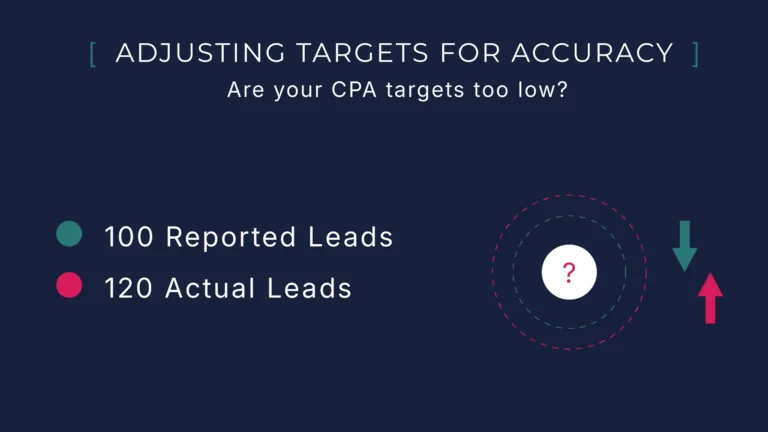
For Ads, it is generally understood that focusing on cost per acquisition (CPA) is best practice – that is, how much is spent to acquire a lead, customer or sale. But, with privacy trends affecting tracking, we need to be mindful of the difference between reported and actual CPA.
With modern platforms all now using some form of algorithm-based bidding, it is common to use CPA as the basis of automated bidding. The challenge being, setting CPA targets too low will supress a campaign and result in lost opportunity.
A suppressed ads account due to misconfigured CPA targets
I personally setup a clients Ads account and campaigns before jumping off after the client felt comfortable managing alone. Around 12 months later, the client returned due to the poor performance of the account.
Nothing had really changed in the setup, so I was basically marking my own homework – on the surface the configuration seemed technically sound.
The key – although the CPA targets were identical, the conversion tracking wasn’t as accurate – the result being in was near impossible for the algorithm to meet the targets.
Privacy changes, including iOS14, had limited the reported conversions being passed by Google Analytics and the client didn’t adjust the targets in the Ads to accommodate for this inaccuracy.
The discovery process
I ran a structured audit to compare reported conversions with actual lead outcomes. Here’s what I found:
- Ads conversion tracking
- Technically functional
- Email deliverability
- Inconsistent (spam detection issues)
- Lead reconciliation
- Missing entirely
- CPA accuracy measurement
- Not in place
A hidden gotcha masking reporting accuracy
The client had been doing the right thing by comparing the reported conversions with what they had been receiving via email. What they didn’t know at the time was the email delivery was unreliable. Missing leads were creating a false sense of alignment between ad conversion numbers and internal records. The reported CPA seemed to sense check.
In the end I found 31% of form submissions were missing due to spam filters, which happened to correlate with the reporting inaccuracy.
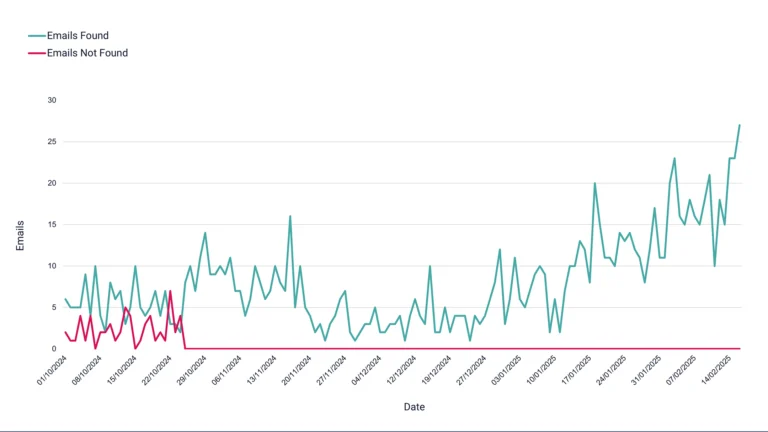
Before and after: This chart highlights how the impact of spam filters on email deliverability affected visibility of incoming leads. A clear gap between actual form submissions and what the business thought was being received.
How we rebuilt CPA tracking around reality
Here’s the process I followed to bring CPA based bidding back in line:
- Google Sheets Lead Tracking
- Captured actual submissions, bypassing email dependency
- Weekly reconciliation
- Created an accuracy rate by comparing tracked vs. received leads
- CPA target recalibration
- Adjusted targets based on real numbers
After fixing the clients deliverability issues and ensuring conversion tracking was as accurate as possible using Google Ads conversion tags instead of GA4 importing we were still left with the unavoidable conversion inaccuracy – actual v reported will never add up due to to privacy technologies.
With leads and source data now captured in Google Sheets (a great interim CRM), we had a much clearer view of actual performance vs what Ads was reporting.
Once we started logging leads and source data in Google Sheets, we had a much clearer view of actual performance vs what the platform was reporting.
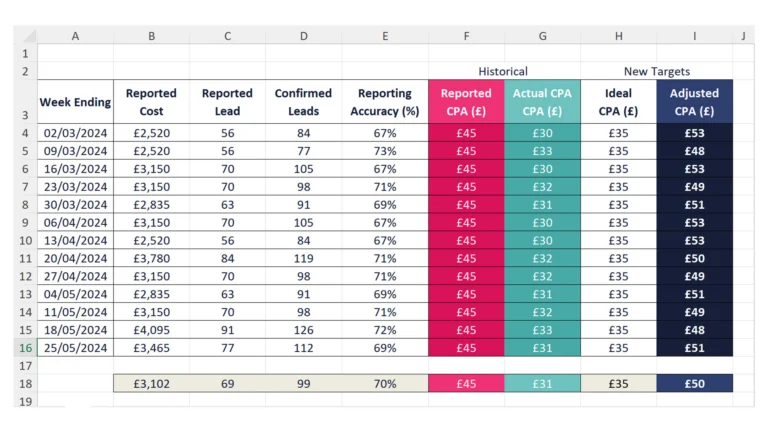
We used Lookers Studio to blend Google Sheet data with live Google Ads conversion data, however above is an example template using excel you can use in your own projects.
Download CPA Target Adjustment Template
Once the adjusted targets were implemented, we were able to recover volume and the account went on to be one of our best performers. And yet, very few businesses review how those targets are set or whether the data feeding them is complete.
For clients that need maximum accuracy, it’s possible to capture the Click ID and send conversion data directly into Ads (bypassing most of the reporting issues altogether). But for this client, that level of setup was overkill.